
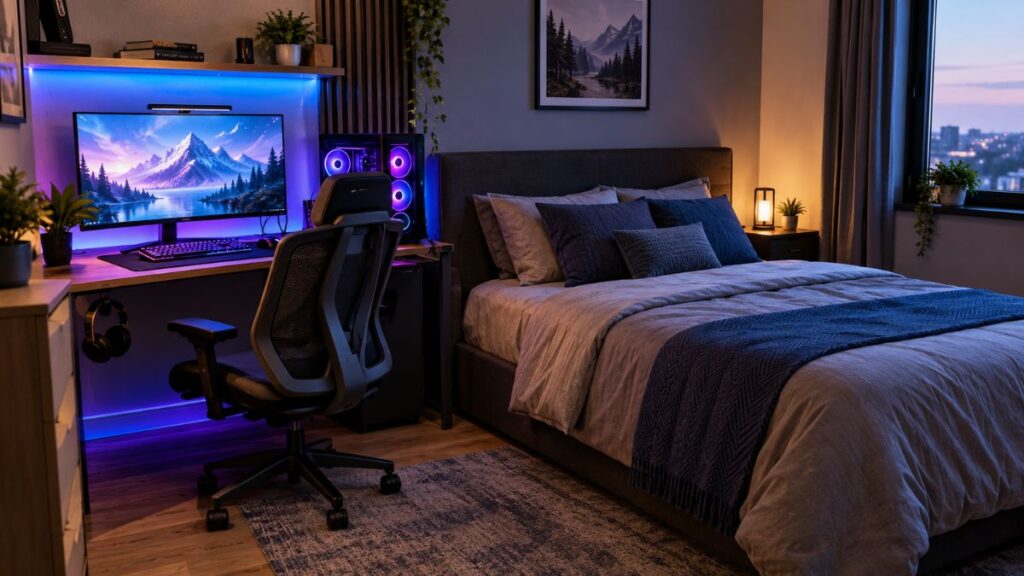
Creating a stylish gaming space doesn’t require a large bedroom or an expensive budget. With the right layout, you can turn even a small room into a comfortable place to play, relax, and enjoy your favorite games. These gaming room ideas help you use limited bedroom space wisely while keeping your setup comfortable, stylish, and organized.
From a compact gaming desk and smart storage to colorful lighting and organized accessories, small changes can make a big difference. Whether you prefer PC gaming or consoles, a space-saving gaming setup can fit your needs. Explore these practical small gaming bedroom ideas to create a functional, modern space that reflects your personality.
21 Small Bedroom Gaming Room Ideas to Maximize Your Space
A successful small bedroom gaming setup starts with the space you already have. Before buying anything, look at your current furniture and decide what can stay. Your existing desk, bed, and storage may be enough to build around.
The goal is to create a space-saving gaming setup that looks good and works well every day. You should have room to move, reach your equipment, open your closet, and sleep comfortably. The following ideas offer different ways to achieve that balance.
1. Corner Gaming Setup for Unused Bedroom Space

An empty corner can become a useful gaming area. A corner gaming desk can fit along two walls and use space that might otherwise remain empty. This layout also gives you a clear place for your monitor, keyboard, mouse, and headphones. It works especially well when the center of your bedroom needs to stay open.
Measure both walls before choosing a desk. Check the position of your outlets and make sure the chair can move backward without hitting your bed. You can add a small shelf above the desk for accessories. This arrangement is one of the most practical small gaming bedroom ideas because it keeps the gaming area separate from your sleeping space without needing a divider.
2. Under-Loft Bed Gaming Setup

A loft bed raises the sleeping area and creates usable space underneath. This can make room for a desk, chair, shelves, and a compact gaming station. An under-loft bed setup is especially useful in narrow bedrooms where a standard bed takes up much of the floor.
Before choosing this design, check the bed’s height and weight limits. Make sure you can sit comfortably at the desk without hitting your head. Leave enough room for your computer to release heat, and avoid blocking its air vents. If the space underneath feels dark, add a desk lamp and soft lighting. A well-planned loft arrangement can combine sleep and gaming while preserving more bedroom floor space.
3. Compact Gaming Desk Beside the Bed
A desk beside the bed can work well when the room has one clear wall available. Choose a compact gaming desk that holds your main equipment without extending too far into the room. A straight desk may be enough for one monitor, a keyboard, a mouse, and a headset.
Check the available space between your bed and desk before buying new furniture. You should be able to get into bed easily and pull out your chair without moving furniture. If the room is very narrow, choose a desk with built-in drawers or a small shelf underneath. This keeps your equipment organized without adding a separate cabinet. The result is a practical gaming setup for a small room that still feels like a bedroom.
4. Wall-Mounted Monitor for a Clutter-Free Setup
A wall-mounted monitor can free up valuable desk space. Instead of placing the screen on a large stand, you can attach it to a compatible wall mount. This leaves more room for your keyboard, mouse, controller, and other accessories. It can also give the setup a cleaner appearance.
Check the monitor’s weight and mounting requirements before installing anything. Some monitors use a VESA mounting pattern, but not every model supports the same mount. Secure the mount to a suitable wall structure and position the screen at a comfortable height. Plan the cable route before drilling, and avoid placing cables where they could become trapped. A well-installed wall-mounted monitor can help create a more organized small bedroom PC gaming setup.
5. Floating Desk for a Minimalist Gaming Room
A floating desk attaches to the wall instead of using traditional legs. This design can make a small room look less crowded because the floor beneath the desk remains open. It also makes vacuuming easier and can suit a clean, modern bedroom.
The desk must be installed with hardware suitable for the wall and the expected load. Do not assume every wall can support a heavy computer and monitor. Check how far the desk extends from the wall to ensure your keyboard, mouse, and monitor fit comfortably.
Add a small cable tray underneath to keep wires out of sight. This minimalist gaming setup works best when you own fewer accessories and prefer a simple, uncluttered look.

6. Small L-Shaped Desk for Maximum Efficiency
A small L-shaped gaming desk can create separate areas for gaming and other activities. One side can hold your monitor and keyboard, while the other provides space for schoolwork, a laptop, or a console. This can be helpful when your bedroom also serves as your home study area.
However, an L-shaped desk is not automatically the best choice for every room. Measure both sides and check that the desk will not block a doorway, closet, or window. You should also have enough chair clearance to sit down and move comfortably. Choose a design that fits the room rather than one that fills the entire corner. With the right dimensions, this layout can improve gaming room layout ideas by keeping different activities organized.
7. Dual-Purpose Bedroom Gaming and Study Setup
A shared desk can support gaming, studying, and everyday computer use. This dual-purpose bedroom gaming setup is useful for students and anyone who does not have space for separate work and gaming areas. A single desk also reduces the need for extra furniture.
Choose a desk that fits your monitor and keyboard while leaving some free space for books or a notebook. A drawer unit or small desktop organizer can hold school supplies when you are gaming. When it is time to study, move your controller and headset into their storage spots. This simple habit helps the room switch between activities without a major rearrangement.
A small bedroom gaming setup can feel more useful when every piece of furniture serves more than one purpose. If your bedroom also serves as a study or workspace, you can make the most of your available space with practical decorating choices. Explore these tips on how to decorate a small home office on a budget to create an organized, attractive workspace without spending too much on new furniture.
8. Console Gaming Corner With Compact Seating
A console setup does not always need a full computer desk. You can place a television or monitor on a suitable stand, mount the screen on the wall, and use a compact chair or floor cushion. This creates a small console gaming setup with fewer pieces of furniture.
Keep the console on a stable surface with enough room for airflow. Avoid placing it inside a closed cabinet unless the cabinet is designed to provide suitable ventilation. Store controllers in a charging dock or controller organizer so they do not get lost under the bed. If you use a television, a compatible TV wall mount may free up space on the furniture below it. Choose a screen position that feels comfortable from your usual seat.
9. Minimalist Gaming Bedroom With Neutral Colors
A minimalist gaming bedroom can look stylish without bright colors or many decorations. Start with a neutral color palette such as warm white, beige, taupe, or charcoal. These shades can blend with common bedroom furniture and bedding. You can then add a small amount of color through your mouse pad, desk accessories, or lighting.
The key is to keep the main surfaces simple. Use matching storage boxes and avoid filling every shelf with collectibles. A few carefully chosen items will stand out more than dozens of unrelated decorations. This approach suits a minimalist gaming room where comfort and organization matter as much as appearance. It can also help your modern gaming bedroom design feel connected to the rest of your home instead of looking like a separate, crowded space.
For a warm and coordinated bedroom, consider using tan, beige, and soft brown tones throughout your gaming area. These shades work well with wooden furniture and neutral accessories. Get more inspiration from these tan bedroom ideas to create a welcoming and stylish space.
10. RGB Lighting for a Modern Gaming Atmosphere

RGB gaming lights let you change the mood of your bedroom with different colors. You can use a single shade for a calm look or select a brighter effect when you want a more dramatic gaming atmosphere. Lighting can also highlight your desk and make the gaming area feel distinct from the sleeping area.
Avoid placing bright lights directly in your line of sight. Strong colors can become distracting, especially in a dark room. Choose adjustable brightness and keep the lighting flexible. Soft blue, purple, or warm white can work as accents, but the best choice depends on your taste and existing decor. A small number of well-placed lights often looks more polished than covering every wall with glowing strips.
11. LED Strip Lighting Behind the Desk and Monitor
LED strip lighting can add a subtle glow behind your monitor or underneath your desk. Behind the screen, it creates monitor backlighting that separates the display from the wall visually. Under the desk, it can highlight the furniture without taking up any extra floor space.
Before installing the strips, clean the surface and check whether the adhesive suits the material. Keep lights and power connections away from spills, heat sources, and areas where cables can be damaged. Choose a brightness that complements your room instead of overpowering it. If your desk is close to a window, test the lighting at different times of day. This helps you balance decorative effects with ambient bedroom lighting and maintain a comfortable space.
12. Vertical Wall Shelves for Gaming Accessories

When floor space is limited, use the walls for storage. Vertical wall shelves can hold game cases, small collectibles, controllers, and decorative items. They help keep your desk clear while making use of the area above it.
Choose shelves that match the weight of the items you plan to display. Secure them correctly and avoid placing heavy objects above your head or directly over sensitive equipment. You can group accessories by type to make them easier to find. Keep frequently used items within reach and store occasional-use items higher up. This approach improves small room organization without adding another cabinet to the bedroom.
13. Wall-Mounted Headset and Controller Storage
Headsets and controllers can quickly take over a small desk. A headset holder or wall hook gives your headphones a fixed place when you finish playing. A controller organizer can keep gamepads together and prevent them from sliding behind furniture.
Place these accessories close enough to reach easily but not where they interfere with the monitor or chair. You can mount a small rail beside the desk or use a compact stand on a shelf. If you charge controllers in the same area, keep the charging cables neat and accessible. A little organization makes the whole station easier to use and gives your small gaming station a cleaner appearance without a costly makeover.
14. Compact Ergonomic Chair That Fits Your Room
A large gaming chair may look impressive, but it can dominate a small bedroom.A well-designed gaming chair offers comfortable support without taking up too much space in your bedroom. Look for adjustable seat height, suitable back support, and a seat width that fits your body.
Check the chair’s dimensions before ordering it. Also measure the space it occupies when pulled away from the desk. Your knees should fit comfortably under the desk, and your feet should rest securely on the floor or an appropriate footrest. A good ergonomic gaming setup should support a comfortable gaming position, with your screen, desk, and chair working together. Comfort is more important than decorative features that you may rarely use.
15. Foldable Gaming Desk for Flexible Bedroom Space
A foldable gaming desk can help when your bedroom has to serve several purposes. You can open it when you want to play and fold it away when you need more room. This option may suit guest bedrooms, shared spaces, or rooms used for exercise and hobbies.
Check the desk’s stability and weight capacity before placing a monitor or computer on it. Some folding desks are better suited to laptops and light equipment than heavy gaming systems. Disconnect or safely manage cables before folding the desk, and never leave equipment balanced on an unstable surface. If you play every day, a fixed desk may be more convenient. If you need the floor to remain flexible, a foldable design can be a useful choice.
16. Monitor Arms to Free Up Desk Space
A monitor arm holds your screen above the desk and can allow you to adjust its position. It may free up space that would otherwise be occupied by a monitor stand. Some arms also let you move the display when switching between gaming and studying.
Check the mount’s specifications to ensure it can safely hold your monitor’s dimensions and weight. Check its mounting pattern and whether your desk is thick and strong enough for the clamp. You also need space behind the desk for the arm to move. Position the screen at a comfortable height and distance rather than pushing it too far away to create a cleaner look. A monitor arm is most useful when it improves both desk space and your everyday viewing position.
17. Smart Cable Management for a Cleaner Setup
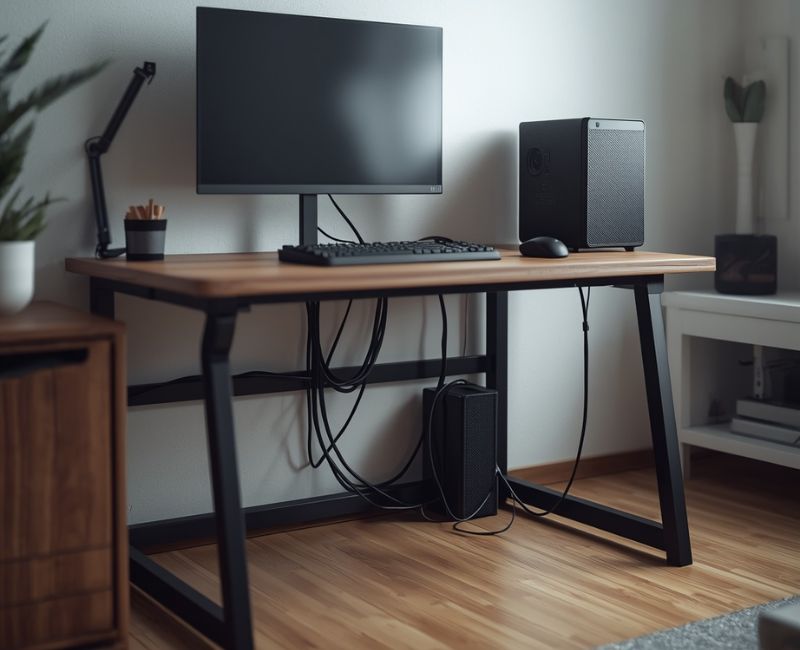
Loose wires can make even an expensive setup look messy. Cable management helps organize power cords, monitor cables, charging leads, and accessory connections. Cable clips, reusable ties, sleeves, and under-desk trays can keep wires grouped together.
Decide where each wire will run before securing the cables in place.Keep cords away from chair wheels, walking paths, and sharp furniture edges. Do not overload outlets or power strips, and make sure you can still reach plugs when needed. Leave enough slack for adjustable monitors and moving equipment. Good gaming cable organization makes cleaning easier and reduces the chance of accidentally pulling a cable loose. It is one of the least expensive changes you can make to improve the look of your gaming area.
18. Multi-Functional Furniture With Hidden Storage
Multifunctional furniture can reduce the number of items you need in a small bedroom. A bed with drawers, an ottoman with storage, or a desk with built-in shelves can hold accessories without requiring separate furniture. This is especially useful when your room already contains a wardrobe and bedside table.
Select storage options that match the items you need to keep organized. Use drawers for controllers, headsets, cables, and game cases, but avoid packing electronics into enclosed spaces where they may overheat. Under-bed boxes can store items you do not need every day. Frequently used accessories should remain easy to reach. Smart storage keeps the room organized and supports a compact furniture arrangement that leaves more space for walking and relaxing. If you prefer furniture with a timeless appearance, consider incorporating mission-style furniture into your bedroom gaming setup. Its clean lines and practical design can complement a compact desk, wooden shelving, and functional storage while keeping the room looking organized.
19. Gaming Bedroom With a Budget-Friendly Setup
You do not need to replace every item to create a better gaming room. A budget gaming setup for the bedroom can begin with your existing desk, chair, computer, or console. First, identify what makes the current setup uncomfortable or difficult to use. Spend money on those problems before buying decorative extras.
For example, a cable tray and a small organizer may improve your setup more than a new gaming-themed desk mat. Moving the desk into a better position can also make the room feel more open without costing anything. Before purchasing furniture, compare available options, confirm the dimensions, and review customer feedback. A gradual upgrade plan allows you to improve your space while keeping spending under control.
20. Sound-Absorbing Curtains, Rugs, and Soft Furnishings
Soft furnishings can make a bedroom more comfortable and reduce some sound reflections. Thick curtains, rugs, bedding, and upholstered furniture may soften the sound inside a room. They can also make a gaming area feel warmer and more connected to the rest of the bedroom.
However, these items do not fully soundproof a room. If you share a home, lower speaker volume or use a headset when others need quiet. Choose a rug that fits safely under the desk and chair, and make sure it does not create a tripping edge. Curtains should not cover heating equipment or interfere with ventilation. A few thoughtful choices can support noise reduction while improving the overall appearance of the room.
21. Personalized Gaming Room With Posters and Collectibles
Your gaming area should reflect what you enjoy. Gaming posters, framed artwork, a small figure display, or colors inspired by your favorite game can make the room feel personal. You do not need to decorate every wall to show your interests.
Choose a clear theme and repeat it through a few items. For example, matching frames and desk accessories can create a coordinated look, while one colorful poster can become the main feature. Use gaming wall decor that fits the available wall space and avoid placing collectibles where they may fall onto your equipment. A personal touch can make the room feel special without making it crowded. The best design is one you enjoy using every day.
How to Plan a Gaming Setup in a Small Bedroom
Good gaming room layout ideas begin with a simple floor plan. Measure the room, note the bed and wardrobe positions, and identify the walls with accessible outlets. A small drawing can help you compare different furniture arrangements before spending money. Leave enough room to open drawers and move your chair freely.
Think about daily use, not just appearance. Your small bedroom gaming setup should let you sleep, study, get dressed, and play without constantly moving furniture. Consider natural light, screen reflections, and accessible power outlets when choosing a location. A practical plan also makes it easier to manage wires and maintain proper ventilation around your computer or console.
Measure Your Bedroom Before Choosing Gaming Furniture
Measure the room’s length and width, then record the dimensions of your bed, wardrobe, and desk. Check door swings, window locations, and closet access. These details help you choose space-saving bedroom furniture that fits the room instead of blocking useful areas.
Choose the Best Layout for Your Bed, Desk, and Monitor
Try a desk against a wall, a corner arrangement, or a desk beside the bed. Compare each option using the furniture you already own. Keep your screen away from direct glare when possible, and check the screen viewing distance recommended for your display. The best layout is the one that feels comfortable and leaves the room easy to use.
Keep Enough Walking Space Around Your Setup
Your chair should slide back without hitting the bed or blocking the door. Leave clear access to your wardrobe, drawers, and windows. Avoid placing cables across walking paths. A thoughtful compact furniture arrangement makes even a tight bedroom feel easier to move around in.
Best Gaming Furniture for a Small Bedroom
The right furniture makes a small gaming room setup more comfortable and easier to maintain. Start with the pieces you use most: your desk, chair, and storage. Choose furniture based on its real dimensions, not only its appearance in product photos. A smaller desk with enough usable surface can be more practical than a large desk filled with decorative features.
Look for multifunctional furniture when your room has several purposes. A desk with drawers, a bed with storage, or a compact shelving unit can reduce clutter. Check product measurements and weight limits before buying. Your goal is to support a comfortable ergonomic gaming setup while keeping the room open enough for everyday life.
How to Choose a Space-Saving Gaming Desk
A desk should hold your screen, keyboard, mouse, and essential accessories without crowding your arms. Check the depth as well as the width. A shallow desk may save space but leave too little room for comfortable use. Choose a stable surface and plan for wires before setting everything up.
Choose a Comfortable Chair Without Overcrowding the Room
Choose a chair that fits your body and desk. Adjustable height and useful back support matter more than oversized side cushions or flashy designs. Check the chair’s width and the space it needs when pulled out. A suitable gaming desk height also helps you keep your shoulders relaxed and your hands in a natural position.
Use Storage Solutions That Keep the Floor Clear

Use under-desk storage, drawers, and wall shelves to keep small items organized. Store controllers and headsets near the desk, but leave computer vents unobstructed. Keep rarely used accessories in labeled boxes. This makes it easier to clean the room and reduces the temptation to pile equipment on the bed.
Small Bedroom Gaming Room Lighting and Decor Tips
Thoughtful lighting and simple decorations can refresh your bedroom’s atmosphere without using extra floor space. Use a combination of general room lighting, task lighting, and small decorative accents.This lighting setup suits both gaming sessions and daily bedroom use. Keep the space attractive by using a few well-chosen accents instead of filling it with colorful decorations.
Aim for glare-free lighting by checking how daylight and lamps reflect on your screen. Adjustable blinds or curtains can help manage bright windows. Choose lighting that can be dimmed, and keep bright LEDs out of your direct view. A balanced setup supports both comfort and a clean modern gaming aesthetic.
Choose Lighting That Reduces Glare on Your Screen
Position the monitor so bright windows do not reflect directly on the display. Diffused lamps can illuminate the room without creating a harsh spot on the screen. If you use RGB gaming lights, adjust their brightness to suit the room. Keep some gentle room lighting on so your screen isn’t the only bright spot in the space.
Match Gaming Room Colors With Your Bedroom Decor
Pick two or three shades that complement your bed linens, curtains, and existing furniture. Soft, neutral tones help gaming gear fit naturally into the bedroom design. Add brighter touches with a mouse pad, decorative items, or LED lights. Coordinating these details gives the room a balanced appearance without the need to buy costly furniture.
Create a Gaming Aesthetic Without Adding Clutter
Use a few carefully selected details, such as framed prints, one shelf of collectibles, or subtle LED strip lighting. Keep wall decorations limited and intentional. A tidy desk and neatly arranged wires can improve the room’s appearance more than extra gaming accessories. Aim for a setup that shows your personality while leaving the space open and comfortable.
How Much Does a Small Bedroom Gaming Setup Cost?
Your total budget will vary depending on which gaming equipment and furniture you already have. If you have a suitable computer or console, you may only need a desk, chair, lighting, and storage. If you need a new monitor and furniture, the total can rise quickly. A budget gaming setup for bedroom use can still look polished when you spend carefully.
Current US retailer listings show compact gaming desks around 56–150 in some listings, while entry-level gaming monitors can cost under $100 during certain sales. Gaming chairs vary widely by design and support features. These prices are examples, not fixed market averages, and can change with sales, stock, and shipping.
Target
+3
Budget-Friendly, Mid-Range, and Premium Setup Costs

The table below estimates the cost of adding furniture, a display, and accessories to an existing computer or console. It does not include a new gaming PC or console, and it excludes tax and delivery.
| Setup level | Estimated US budget | Possible setup |
| Budget-friendly | 200–500 | Basic desk, entry-level chair, monitor if needed, simple lighting, and cable organizers |
| Mid-range | 500–1,000 | Better desk and chair, upgraded monitor, monitor arm, storage, and improved lighting |
| Premium | 1,000–2,000+ | Higher-quality furniture, premium display, refined accessories, and coordinated lighting |
These are planning ranges rather than verified package prices. The actual total depends on which items you need and whether you buy new, used, or discounted products. A premium gaming chair or monitor can cost more than the entire budget of a basic setup.
Where Should You Spend First?
Prioritize the items you will use most often. A sturdy desk, a supportive chair, and a good-quality screen are generally more valuable than decorative extras. If your current equipment works well, keep it and improve the layout first. Add monitor backlighting, shelves, or themed decor later.
Example: Imagine a bedroom with an existing laptop, monitor, and desk. The owner could start by organizing cables, moving the desk into a corner, and adding a headset hook.This simple adjustment can help reduce clutter without the need to buy new furniture. This is an illustrative example, but it shows why identifying the real problem before shopping can save money.
Common Small Bedroom Gaming Setup Mistakes to Avoid
Even attractive bedroom gaming setup ideas can fail when they ignore everyday needs. A desk that looks compact online may be too deep for the room. Bright lighting may create screen reflections, while poorly placed furniture can block access to a closet. Check the available area and decide how you plan to use it before purchasing new items.
Comfort and safety also matter. Keep cables away from walking paths, leave air vents open, and avoid overloading power outlets. An organized gaming space should improve everyday comfort and functionality, not simply look attractive in pictures.Small changes to placement, storage, and lighting can often solve problems more effectively than adding more equipment.
Buying a Gaming Desk That Is Too Large
A large desk can leave little space for the chair or bed. Check its width and depth, including any attached shelves or monitor stands. Mark the proposed dimensions on the floor with removable tape.This helps you understand how the furniture will fit in your room before making a purchase.
Blocking Natural Light and Walking Paths
Do not place furniture where it prevents doors, drawers, or windows from opening.Make sure there is an unobstructed path between your bed and the bedroom entrance. If possible, use natural light without allowing it to reflect directly on your screen. A good arrangement supports gaming while keeping normal bedroom activities simple.
Ignoring Cable Management and Airflow
Loose wires can tangle around chair wheels or become disconnected. Use clips and ties to organize them, but keep plugs accessible. Leave enough space around computers and consoles for air to move. Proper ventilation helps equipment release heat as designed, while a clear floor makes the setup easier to clean.
Frequently Asked Questions
1. How do you create a gaming room in a small bedroom?
Start by measuring your bedroom and choosing furniture that fits the available space. Use a compact desk, wall shelves, and smart cable storage to keep your gaming area organized and comfortable.
2. What is the best gaming desk for a small bedroom?
A compact straight desk or corner desk works well in most small bedrooms. Choose one with enough space for your monitor, keyboard, and mouse without blocking walkways or making the room feel crowded.
3. How can I make my small bedroom gaming setup look stylish?
Choose a consistent color scheme and add subtle LED lighting, matching accessories, and a few gaming decorations. Keep your desk clean and organize cables to create a modern, polished appearance.
4. How much does a small bedroom gaming setup cost?
A basic setup may cost around 200–500 if you already own a computer or console. A mid-range setup can cost 500–1,000, depending on your furniture, monitor, chair, and accessories.
5. Where should I place my gaming desk in a small bedroom?
Place your desk against an available wall or in an unused corner to save space. Make sure your chair can move comfortably and your monitor avoids direct window glare.
6. How can I save space in a small bedroom gaming room?
Use wall-mounted shelves, a monitor arm, and under-desk storage to reduce clutter. Multi-functional furniture and vertical organizers can free up floor space while keeping your gaming equipment easy to reach.
Conclusion
A comfortable gaming area starts with using your available bedroom space wisely and choosing furniture that meets your needs. Start with measurements, choose furniture that fits, and organize your equipment before adding decorative upgrades. The right Small Bedroom Gaming Room Ideas can help you combine gaming, studying, and relaxing without sacrificing comfort.
Focus on one improvement at a time. You might begin with a better desk position, then add storage, lighting, and personal touches as your budget allows. With a clear plan, even a small bedroom can become a comfortable and stylish place to enjoy your favorite games.

Welcome to Cozy Escape Hub! I am Muhammad Hassaan, an AI Powered SEO and content writer with a 2 years of experience.
I help websites rank higher, grow traffic , and look amazing. My goal is to make SEO and web design simple and effective for everyone. Let’s achieve more together!